
About soona
soona is a fast, affordable content platform for brands, with professional photography and videography studios in Denver, Austin, and Minneapolis. In June 2023, soona acquired Trend, a creator network specializing in user-generated content (UGC). The two platforms are now unified, so brands can manage both studio content and UGC creator campaigns in one place at soona.co.
Pricing
UGC on soona is priced per video. Pricing varies based on the creator’s level — Level 1 (Classic) starts at $89/video. Higher creator levels are priced accordingly. For the most up-to-date pricing, visit soona.co or contact hey@soona.co.
What do the creator levels mean?
Level 1: Classic
Equipment and Visuals:
-
Shot on iPhone, single angle, auto settings
-
Natural or ambient lighting
-
Simple background; avoid distracting environments
Audio and Editing:
-
Clear audio - proper grammar, clear diction
-
Minimal to no editing; no filters or transitions
On-Camera and Delivery:
-
Comfortable on camera with a straightforward, conversational tone
-
Simple or no hook - basic introductions
Level 2: Pro
Equipment and Visuals:
-
Phone with stabilizer or tripod; DSLR or well-controlled camera
-
2 or more angles or varied framing: intentional composition
-
Tidy, aesthetic background; correct aspect ratio and caption-safe zones
-
Intentional lighting (ring light, soft box, or well-positioned natural light)
Audio and Editing:
-
Clean audio via lapel mic or quiet environment; may incorporate music
-
Clean cuts, light transitions, basic color correction, and captions where relevant
On-Camera and Delivery:
-
Thoughtful pacing with a clear hook - story/demo - CTA structure
-
Confident and natural; shows personality without feeling scripted
-
Strong hook awareness - understands the first 3 seconds matter
-
Performance driven openings; problem/solution, bold statement, curiosity
Level 3: Elite
Equipment and Visuals:
-
Professional camera with manual control; advanced composition, intentional movement
-
Multiple scenes and angles; styled sets or scouted locations
-
Strategic product styling integrated into the shoot
-
Multi-source or studio-quality lighting, consistent throughout
Audio and Editing:
-
Professional grade audio; intentional use of ambient sound and music
-
Polished editing: dynamic pacing, color grading, motion graphics, smooth transitions
On-Camera and Delivery:
-
Extremely natural and engaging; can shift tone - educational, emotional, hype
-
Scroll-stopping hooks with strong storytelling and conversion-focused messaging
-
Understands platform trends and audience behavior
Creating a UGC Campaign
To get started, click UGC in the left-hand navigation of your soona dashboard, then click “Create Campaign” and follow the steps below.
Step 1: Choose your platform and video length
Select where the content will be used. Each platform has its own recommended style:
- TikTok: Recommended for high-engagement short-form content
- Instagram: Reels, Stories, or Feed
- Meta Ads: Best for paid social storytelling and educational content
- Amazon: Optimized for Amazon product pages
- Other: Website, YouTube, X, or custom request
Then select your preferred video duration: up to 15 seconds, 30 seconds, or 60 seconds.
Step 2: Add your products
Add one or more products you’d like creators to feature. You have two options:
- Choose from your product catalog – Pull from your saved products.
- Add product info manually – Fill in product name, value, listing URL, and description yourself.
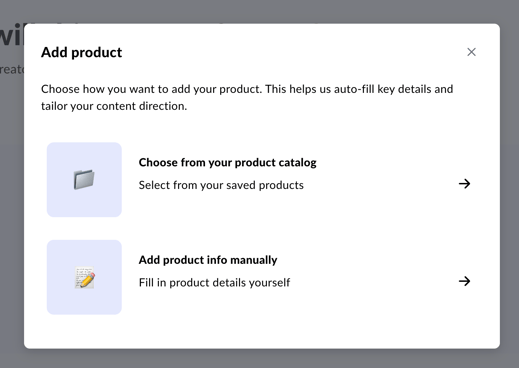
Tip: If you’re on Amazon or Shopify, you can import products automatically by integrating your account.
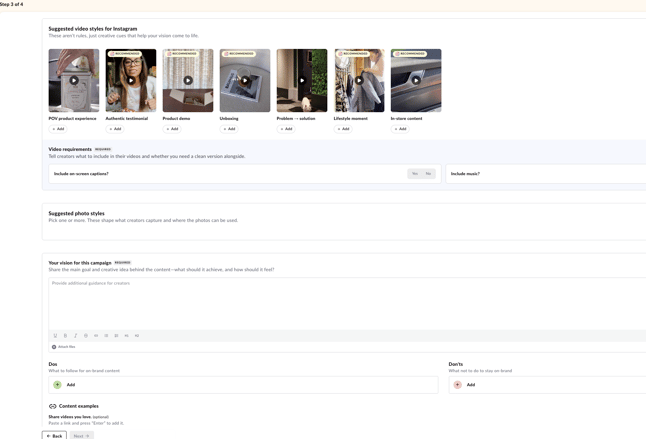
Step 3: Set your creative direction
Guide creators on what you’re looking for. You can:
- Select suggested video styles (POV storytelling, testimonial, interview, behind the scenes, educational, etc.)
- Write a vision statement describing the main goal and creative idea behind the content
- Add Do’s and Don’ts to keep creators on-brand
- Share reference videos or attach files for additional context
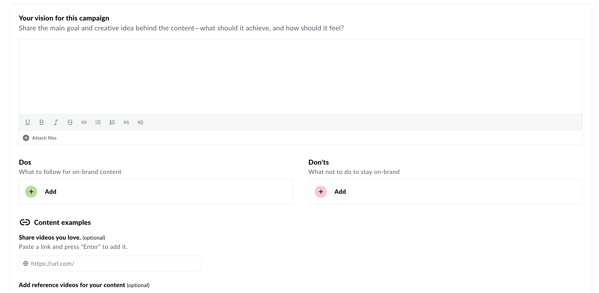
Tip: Video and photo styles are flexible suggestions, not fixed requirements. If you want one specific style, select only that one so creators know exactly what you’re after.
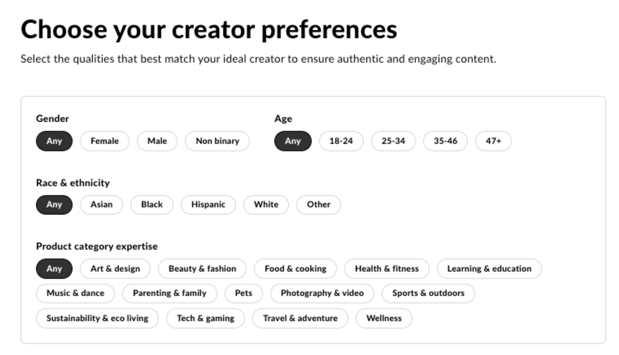
Step 4: Set your creator preferences
Choose the qualities that best match your ideal creator:
- Gender, age range, race and ethnicity
- Product category expertise (beauty & fashion, health & fitness, food & cooking, pets, and more)
Important: Once you approve a creator, you cannot edit the campaign brief. If you need to make changes after hiring a creator, communicate with them directly via the Messages tab.
Finding and Hiring Creators
Option 1: Accept incoming applications
Once your campaign is live and accepting applications, creators can find it in the marketplace and apply. Review their application, portfolio, and profile to decide if they’re a good fit.
Option 2: Invite creators directly
You can also proactively search the Talent Directory and invite creators to apply.
- Click “Invite creators” on your campaign page.
- Browse creator profiles, view their portfolio, headshots, and environment photos.
- Click “Hire [Name]” to send an invitation to apply. You can also personalize your invitation message.
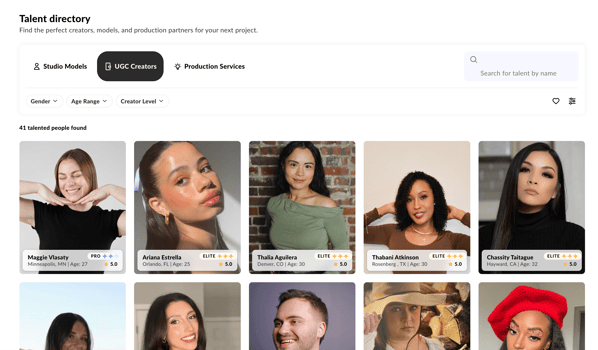
Note: Clicking “Hire” sends the creator an invitation to apply. It does not automatically hire them.
Approving a creator
When a creator applies, you’ll see their profile, application note, and portfolio. You’ll also see how many videos per week they’ve committed to delivering. Select how many total videos you’d like them to create, and the platform will calculate an estimated delivery schedule broken down by batch.
Communicating with Creators
Use the Messages tab within your campaign to communicate directly with each creator. Send shipping instructions, brand notes, good-to-knows, or anything else that will help them produce great content.
Be as communicative as possible. Creators who receive clear direction from brands tend to deliver stronger content with fewer revisions.
Shipping Products to Creators
Go to the Shipments tab in your campaign to manage product delivery.
- Click “Add Shipping Info” next to each creator who needs a product. Enter the shipping carrier and tracking number. Adding a tracking code is required for soona to assign due dates and keep content delivery on schedule.
- If the product doesn’t require shipping (for example, a digital product), check “This product does not need shipping” and click Mark as shipped. The creator’s content will be due 7 days from that date.
- If you’d prefer creators to purchase the product from your website, provide them with a free coupon code or a way to get the product at no cost to them.
Managing Due Dates
Due dates are assigned automatically once products are marked as delivered. You can track each creator’s status and deliverables from your campaign dashboard.
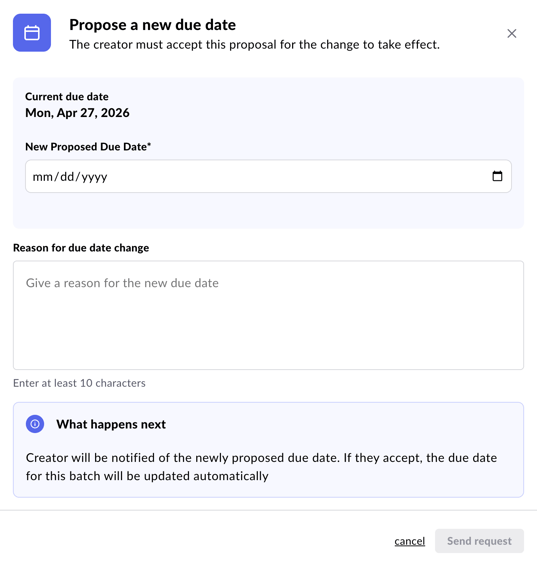
New feature: You can propose a due date change for any creator. Click “Adjust due date” next to the relevant campaign, submit your proposed new date, and the creator will either approve or decline.
Reviewing Content and Requesting Revisions
Reviewing uploaded content
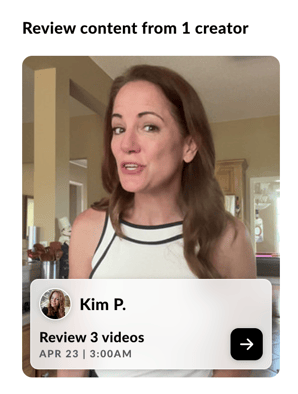
When a creator uploads content, you’ll see a “Review [X] videos” prompt in your campaign. Watch the videos and approve or request a revision for each.
Requesting a revision
If the content needs changes, click “Request Revision” and write your feedback in the text field.
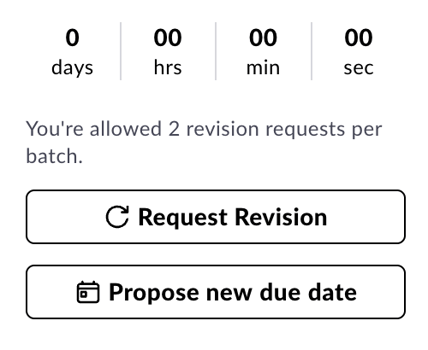
- Brands can submit up to 2 revision requests per video, per creator.
- Be specific and clear about what needs to be changed. Vague feedback leads to multiple rounds of revisions.
- The creator will receive your feedback via email and in-platform notification, and has 72 hours to re-upload.
- Your revision note will also appear in the campaign’s message thread.
If you still have questions, reach out to us at hey@soona.co and we'll get back to you as soon as we can.